There are three questions inside this one and they have different answers. Separating them is most of the work.
Question one: is the device legal?
Yes, in every state. Published compilations of state dash cam rules agree on this consistently: no state prohibits owning or using a dash cam. What varies is placement and audio.
Question two: where can you mount it?
This is the one that produces citations. Several states restrict what may be attached to a windshield and where, generally under statutes about obstructing the driver's view. The published compilations describe rules such as a permitted lower corner with a maximum size in square inches on the driver's side and a larger allowance on the passenger side, and at least one state whose opacity rules do not permit windshield mounting at all.
Question three: can you record audio?
This depends on your state's wiretapping and consent law, not on any dash-cam-specific statute. Some states require the consent of all parties to a recorded conversation; others require only one. A dash cam recording your passengers' conversation without telling them is where that becomes relevant.
The practical answer is simple: tell passengers the camera records audio, or switch audio recording off. Every camera on this site lets you disable it, and video is what settles a collision claim anyway.
Quick picks
| # | Product | Best for | Price |
|---|---|---|---|
| 1 | 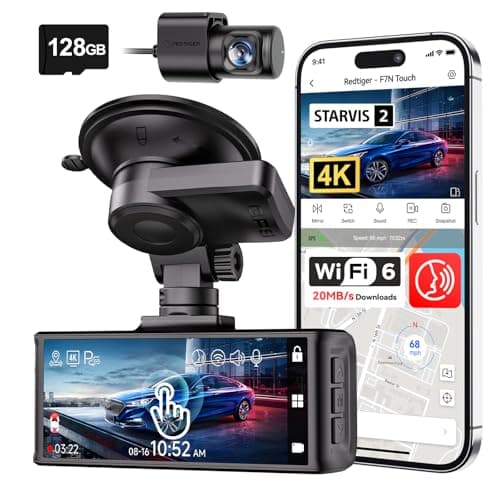 REDTIGER F7N Touch 4K Front + Rear Dash CamSTARVIS 2 sensor, 4K front, supercapacitor, GPS and a touch screen. On paper this is the most complete specification on this page. REDTIGER F7N Touch 4K Front + Rear Dash CamSTARVIS 2 sensor, 4K front, supercapacitor, GPS and a touch screen. On paper this is the most complete specification on this page. | The best-specified sensor here | $169.99 · View on Amazon #ad Price as of October 25, 2026. How we’re funded |
| 2 | 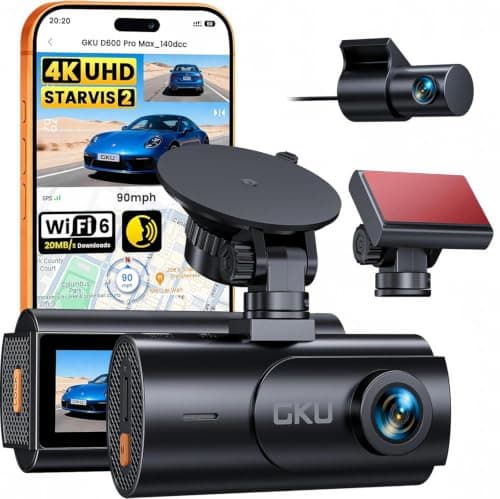 GKU D600 Pro Max 4K Dual Dash Cam, STARVIS 2The cheapest camera on this site that names its sensor rather than quoting megapixels — a Sony STARVIS 2, which is the part that decides whether a plate is readable at night. GKU D600 Pro Max 4K Dual Dash Cam, STARVIS 2The cheapest camera on this site that names its sensor rather than quoting megapixels — a Sony STARVIS 2, which is the part that decides whether a plate is readable at night. | A named sensor at the bottom of the price range | $79.99 · View on Amazon #ad Price as of October 25, 2026. How we’re funded |
| 3 | 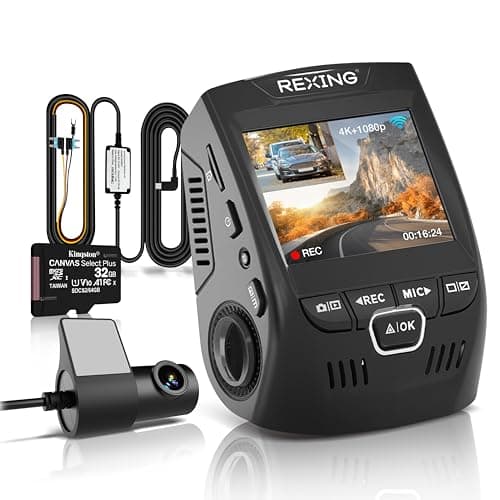 REXING V1P 4K Dual-Channel Dash Cam4K front, 1080p rear, 170°, and the only camera here that publishes what its supercapacitor tolerates: -20°F to 176°F. It also ships the hardwire kit parking mode actually needs. REXING V1P 4K Dual-Channel Dash Cam4K front, 1080p rear, 170°, and the only camera here that publishes what its supercapacitor tolerates: -20°F to 176°F. It also ships the hardwire kit parking mode actually needs. | A published temperature range, and the kit to use parking mode | $149.99 · View on Amazon #ad Price as of October 25, 2026. How we’re funded |
#1 · The best-specified sensor here
REDTIGER F7N Touch 4K Front + Rear Dash Cam
REDTIGER
STARVIS 2 sensor, 4K front, supercapacitor, GPS and a touch screen. On paper this is the most complete specification on this page.
STARVIS 2 is Sony's low-light sensor line and it is the specification that actually decides whether a night plate is readable. Resolution without sensor quality gives you a very sharp picture of nothing.
A supercapacitor instead of a lithium battery is the right choice for a device that lives on a windshield. Batteries swell and fail in summer heat; capacitors tolerate it.
Parking mode on a G-sensor trigger records on impact. It does not record the person who keyed your door and walked away — that needs a motion or time-lapse mode and, usually, a hardwire kit.
What works
- STARVIS 2 sensor, published
- Supercapacitor rather than a battery
- 5 GHz Wi-Fi transfers footage far faster than 2.4 GHz
- 128 GB card included
What does not
- Rear camera is 1080p, not 4K
- Parking mode is impact-triggered rather than continuous
- No published operating temperature range on this listing
Skip this if
Skip it if you want true 24-hour parking surveillance. That needs continuous power and a hardwire kit, and this is not sold as that.
Where these numbers came from
We have not handled this product. Here is what we did instead.
#2 · A named sensor at the bottom of the price range
GKU D600 Pro Max 4K Dual Dash Cam, STARVIS 2
GKU
The cheapest camera on this site that names its sensor rather than quoting megapixels — a Sony STARVIS 2, which is the part that decides whether a plate is readable at night.
A named sensor is the one specification that predicts night performance, and at this price it is usually the first thing to disappear behind a megapixel number. STARVIS 2 is the current Sony low-light part and it is stated outright here.
Pre-recording is the parking feature worth understanding. An impact trigger starts recording once something has already hit you; pre-recording keeps a rolling buffer, so you get the thirty seconds before the hit as well as after it.
Read the HDR line carefully, because it is a trade the listing states and most buyers miss: HDR only runs with the front camera alone. Plug the rear camera in and you lose it.
What works
- Names a Sony STARVIS 2 sensor rather than publishing megapixels
- Three parking modes including a pre-event buffer
- 5.8 GHz Wi-Fi 6 at up to 20 MB/s, the fastest transfer figure on this page
- Supercapacitor and built-in GPS
What does not
- No memory card in the box on this version
- HDR is unavailable whenever the rear camera is connected, per the listing
- Parking mode needs a hardwire kit sold separately
- 1080p rear
Skip this if
Skip it if you want to unbox it and drive. There is no card in this version and no hardwire kit, so budget for both before the headline features work.
Where these numbers came from
We have not handled this product. Here is what we did instead.
#3 · A published temperature range, and the kit to use parking mode
REXING V1P 4K Dual-Channel Dash Cam
REXING
4K front, 1080p rear, 170°, and the only camera here that publishes what its supercapacitor tolerates: -20°F to 176°F. It also ships the hardwire kit parking mode actually needs.
170° is the sweet spot for a front camera. Wider captures more lanes and distorts plates at the edges; narrower misses the car that came in from the side.
A windshield in direct summer sun goes well past 140°F. A camera rated to 176°F has margin; one with no published rating is an unknown you are mounting to glass.
The hardwire kit in the box is worth more than it sounds. Every camera on this site advertises parking mode, and on all of them it needs constant power the car does not supply when it is off — which normally means a second purchase before the headline feature works at all.
What works
- Publishes an operating temperature range
- Hardwire kit and a 32 GB card included, so parking mode works out of the box
- Both parking modes: impact trigger and 24/7 time-lapse
- Long-standing model from an established brand
What does not
- 1080p rear
- No GPS on this model
- No published sensor model
- 256 GB card ceiling, lower than the newer cameras here
Skip this if
Skip it if the night-time rear plate is what you care about. 1080p at night is not a plate reader.
Where these numbers came from
We have not handled this product. Here is what we did instead.
What about recording other people in public?
Filming what happens on a public road from your own vehicle is generally not restricted the way audio is, and it is the basis of the entire product category. Where it can become an issue is publishing footage that identifies people, which is a different question from recording it. That is worth thinking about before uploading anything.
The sources for this, and their limits
The state-by-state detail above comes from published compilations maintained by dash cam vendors and fleet-industry sources. Those are a reasonable starting point and they are not authoritative: they are secondary, they are commercially motivated, and they go out of date.
Your own state's vehicle code, or its DMV, is the source that matters. We are naming ours rather than presenting a compiled table as though we had read fifty statutes, because we have not. Nothing on this page is legal advice.
The practical summary
- Mount behind the rear-view mirror. This avoids the windshield question in every state.
- If you must mount elsewhere, check your own state's rule on windshield attachments before you stick it down.
- Either tell passengers about audio recording or turn audio off.
- Do not mount anything where it obstructs your own view, regardless of what any statute says specifically.
Sources
Everything on this page traces back to one of these. Where a figure could not be sourced, the page says so rather than filling the gap.